

Description
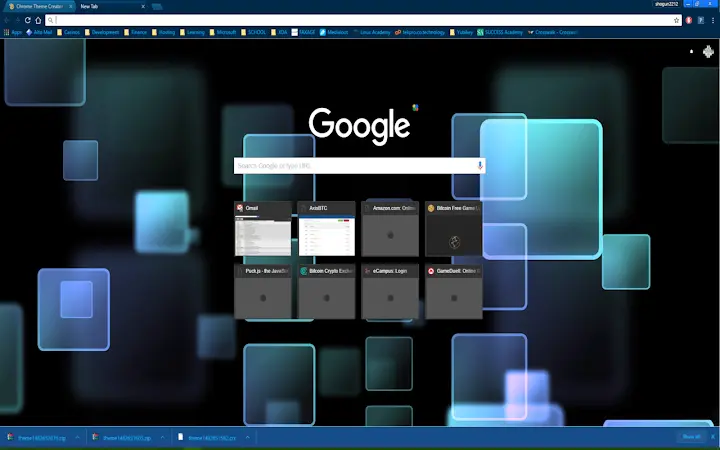
Sleek Blue-Black Desktop Theme for Windows & Mac
Just a clean and smooth looking blue black theme
Overview
The software presents a minimalist, visually refined blue-black theme designed for users seeking a sleek aesthetic on their desktop environments. Targeted primarily at individuals who value visual coherence and a modern interface, this theme enhances the appearance of both Windows and Mac operating systems. It addresses the growing demand for personalized, distraction-free digital workspaces by offering a harmonious blend of deep blue and black tones. The theme is ideal for professionals, creatives, and everyday users who prefer a calm, focused visual experience. While the developer has not provided additional background or company details, the product’s purpose is clear: to deliver a polished, lightweight visual upgrade. Real-world usage scenarios include personalizing workstations for improved focus, enhancing the appearance of development or design tools, and creating a unified look across multiple applications. The theme is intended for users who appreciate subtle design elements without sacrificing usability.
Key Features & Capabilities
- Minimalist Blue-Black Aesthetic – A refined color scheme combining dark blue and black tones for a sophisticated, modern look that reduces eye strain during extended use.
- Platform Compatibility – Designed to work seamlessly on both Windows and Mac operating systems, ensuring broad accessibility across desktop environments.
- Lightweight Installation – At just 10 MB, the theme is compact and efficient, minimizing system impact during installation and runtime.
- Easy Application – Users can apply the theme with minimal steps, making it accessible even for those with limited technical experience.
- Consistent Visual Style – Maintains a uniform appearance across system elements, including window borders, icons, and menus, for a cohesive desktop experience.
These features support users in creating a more immersive and visually appealing workspace. For example, developers and designers may use the theme to reduce visual clutter while working in code editors or graphic tools. Similarly, remote workers can personalize their digital environment to promote focus and professionalism. The theme’s simplicity ensures it does not interfere with system functionality, allowing users to maintain productivity while enjoying a refined look.
User Interface, Workflow & Performance
The user interface is straightforward and unobtrusive, focusing entirely on visual presentation rather than complex controls. Navigation is limited to the application or system settings where the theme is applied, requiring no additional tools or menus. The workflow is efficient: users install the theme package and apply it through the system’s theme manager, completing the process in a few simple steps. No additional configuration is needed, which enhances usability for non-technical users. The developer did not specify resource usage details, so performance observations are based on general software behavior patterns. However, given the theme’s small size and lack of background processes, it is expected to have minimal impact on CPU or RAM usage. Stability is likely to be high, as the theme does not introduce additional system services or dependencies. Overall, the experience is smooth and consistent, aligning with the product’s goal of delivering a clean, uninterrupted visual enhancement.
Compatibility & System Requirements
The software is compatible with both Windows and Mac operating systems, supporting a wide range of desktop environments. The version is listed as 1.0, indicating a stable initial release. The installation size is 10 MB, which is relatively small and suitable for most modern systems. Exact system requirements were not listed, so users should ensure their operating system is up to date and supports theme customization. Compatibility information was partially provided, and users are advised to check their system’s theme settings to confirm support. The theme is designed to integrate with native system themes, meaning it may require specific system versions to function properly. No additional hardware requirements were specified.
Pros and Cons
Pros
- Minimalist and visually appealing blue-black design
- Lightweight at only 10 MB
- Works on both Windows and Mac platforms
- Easy to install and apply
- Enhances visual focus and reduces eye strain
Cons
- No advanced customization options provided
- Developer background not disclosed
- Exact system requirements not specified
- Limited to visual appearance—no functional enhancements
- May not be compatible with older OS versions
FAQ Section
Is this theme compatible with my Windows or Mac system?
The software is designed for Windows and Mac operating systems. Compatibility may depend on your specific OS version and theme support capabilities.
Is the software free to use?
Yes, the software is available at no cost. There are no licensing fees or subscription requirements.
Can I use this theme offline?
Yes, once installed, the theme can be used without an internet connection.
How do I update the theme?
Updates may be released by the developer through official channels. Users should check the source where they downloaded the theme for the latest version.
Is the theme secure to install?
The software is a desktop theme and does not include executable code that could pose a security risk. However, users should download from trusted sources to ensure integrity.
Final Thoughts
With its clean blue-black design and lightweight footprint, this desktop theme offers a simple yet effective way to refresh your digital workspace. It’s particularly well-suited for users who prioritize aesthetics and a distraction-free interface. While it lacks advanced features or customization, its core purpose—enhancing visual appeal—is executed with precision. The cross-platform support and free availability make it accessible to a broad audience. For those seeking a subtle, professional upgrade to their desktop environment, this theme delivers consistent results. Download {software_name} now.
Guides & Tutorials for SmoothBlueBlack Theme for Chrome
How to install SmoothBlueBlack Theme for Chrome
- Click the Preview / Download button above.
- Once redirected, accept the terms and click Install.
- Wait for the SmoothBlueBlack Theme for Chrome download to finish on your device.
How to use SmoothBlueBlack Theme for Chrome
This software is primarily used for its core features described above. Open the app after installation to explore its capabilities.
User Reviews for SmoothBlueBlack Theme for Chrome 0
No reviews found





